Start here
By product
When it goes wrong
Looking for what a specific tool does? The toolbox lists every one of them.
By product
3ds Max
28 actions in Autodesk 3ds Max 2024 to 2027 — the scene and its selection, objects, cameras and lights, modifiers and materials, file exchange, viewport capture and rendering.
What It Can Reach
Modify 5
File & interop 5
Scene & selection 4
Connector & diagnostics 4
Create 3
Materials 2
View & render 2
Context & knowledge 2
Code execution 1
Every action is listed with a one-line description in the toolbox entry.
Pilot AI for 3ds Max in the toolbox →
Walkthrough: Blocking Out a Scene
Start with what is there, then build:
“What’s in this scene, and which objects have no material?”
“Add a 20 × 12 m plane for the ground, a box for the building mass, and a camera at eye level looking at the entrance.”
Every object it creates comes back with its name, so the next request can simply refer to it: “make that box 18 m tall”.
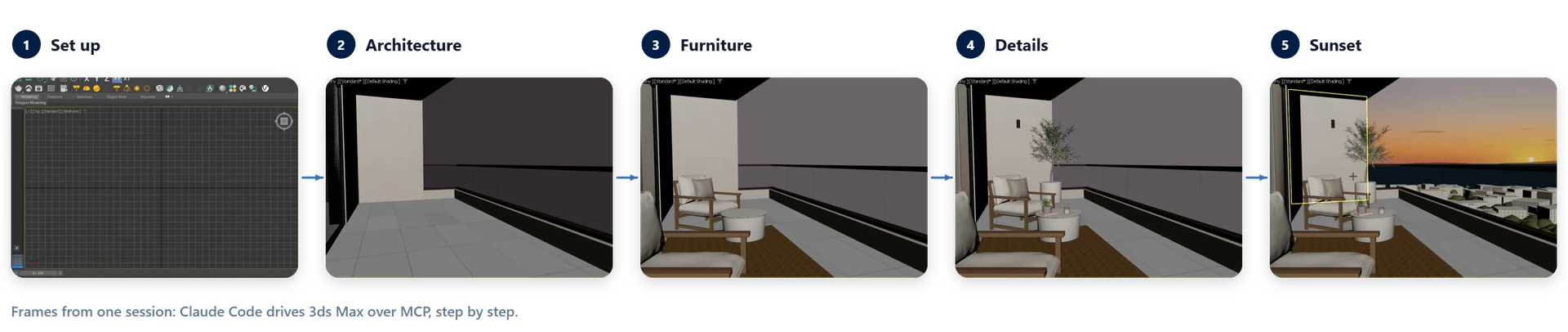
Walkthrough: From a BIM Export to a Web Model
The file actions cover the round trip:
“Import the FBX from Revit, put everything on a layer called Imported and give the glass a transparent material.”
“Export the selection to glTF.”
Import takes FBX, OBJ, DWG, USD, Alembic and more; export writes FBX, OBJ, USD, glTF, Alembic, DWG or STL.
Walkthrough: Checking and Rendering
The viewport capture is a screenshot the assistant can see, so it can check its own work:
“Take a viewport screenshot and tell me if the camera frames the whole building.”
When it looks right:
“Render the current camera view.”

MAXScript, When No Action Fits
The assistant can write and run MAXScript in the live scene. Pilot Chat shows the script and asks first; Settings → Security turns the code tool off. Safe Scene Script Execution blocks most .NET object creation — a refused script is the protection working.
Several 3ds Max Windows
3ds Max always has a scene open, so with several windows the connector talks to the first one started. Ask “which 3ds Max windows are open?” to see them all.