Guide · BIM
BIM automation: what to automate in Revit, and which approach fits each job
BIM automation means letting software do the repetitive, rule-based parts of model work: renumbering, sheets, exports, parameter clean-up and checks. In Revit there are four practical ways to do it: Dynamo, scripts, add-ins and AI assistants. Here is what each is good at, how they combine and where to start.
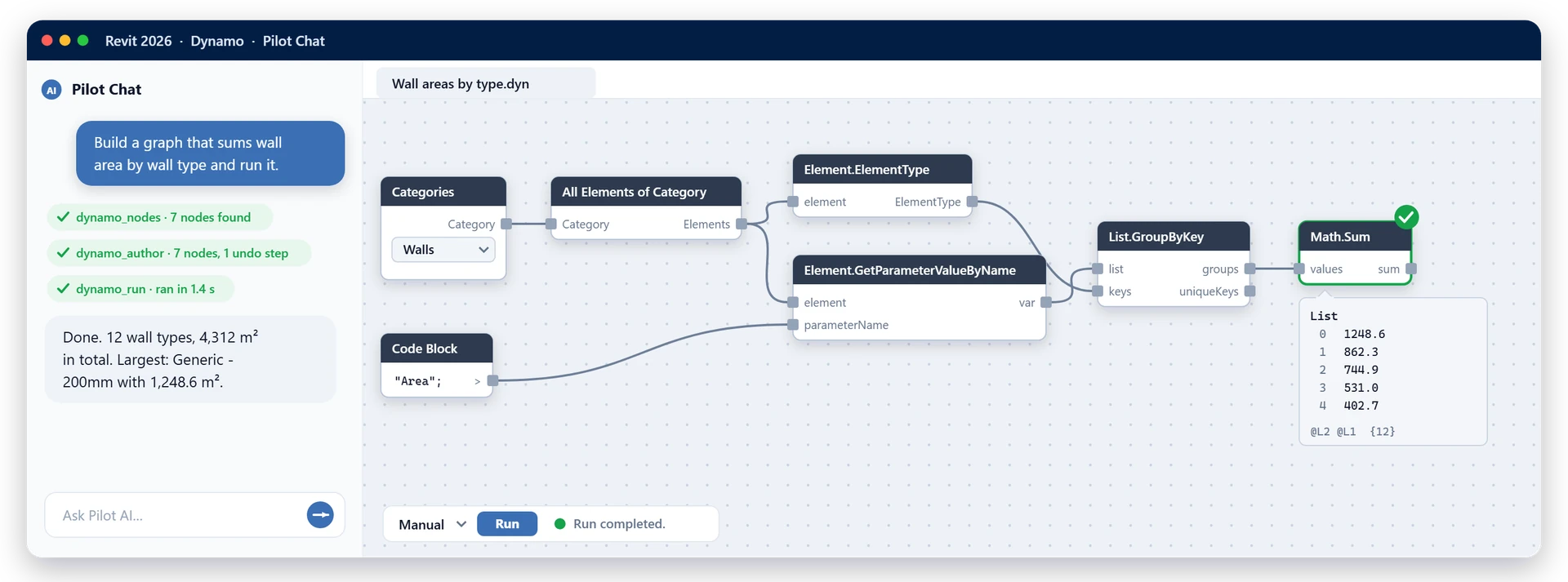
What BIM automation is, and isn’t
BIM automation is any operation on a model, or on what you produce from it, that runs from a rule instead of a person clicking. The same model and the same rule give the same result every time, which is what lets you trust a whole sheet set without opening each sheet.
It is not software taking design decisions, and it does not fix a missing standard: if your naming rule lives only in people’s heads, write it down first.
The Revit tasks worth automating
Good candidates come up often, follow a rule you could write on one line and are tedious to check by eye:
- Naming and renumbering: sheets, views, rooms and marks brought to one scheme.
- Sheets and exports: a sheet per level with its plan placed, then the PDF, DWG, IFC and NWC set for each issue.
- Parameters and data: bulk values, Excel round trips and the same shared parameters in every project.
- Model checks: warnings, empty values, unplaced rooms and duplicate types, checked before every issue.
- Coordination: linking the latest models, rerunning the same clash tests and reporting the results.
Poor candidates are one-off design moves. Automate the preparation around a decision, not the decision.
Four ways to automate Revit
1. Dynamo: visual scripting
Dynamo ships with Revit and Civil 3D. You wire nodes into a graph instead of writing code, and Dynamo Player lets colleagues run a saved graph with their own inputs. Fits clear rules over model data, built by someone who thinks visually and run by people who never open Dynamo. Keep each graph to one job: large ones get hard to debug.
2. Python scripts and pyRevit
Python calls the Revit API directly, inside a Dynamo Python node or through pyRevit, a free, open-source add-in that turns scripts into ribbon buttons. Loops and conditions that take a screen of nodes take a few lines. Fits teams with someone who writes and maintains code. The cost is ownership: every script needs someone to fix it after a Revit upgrade.
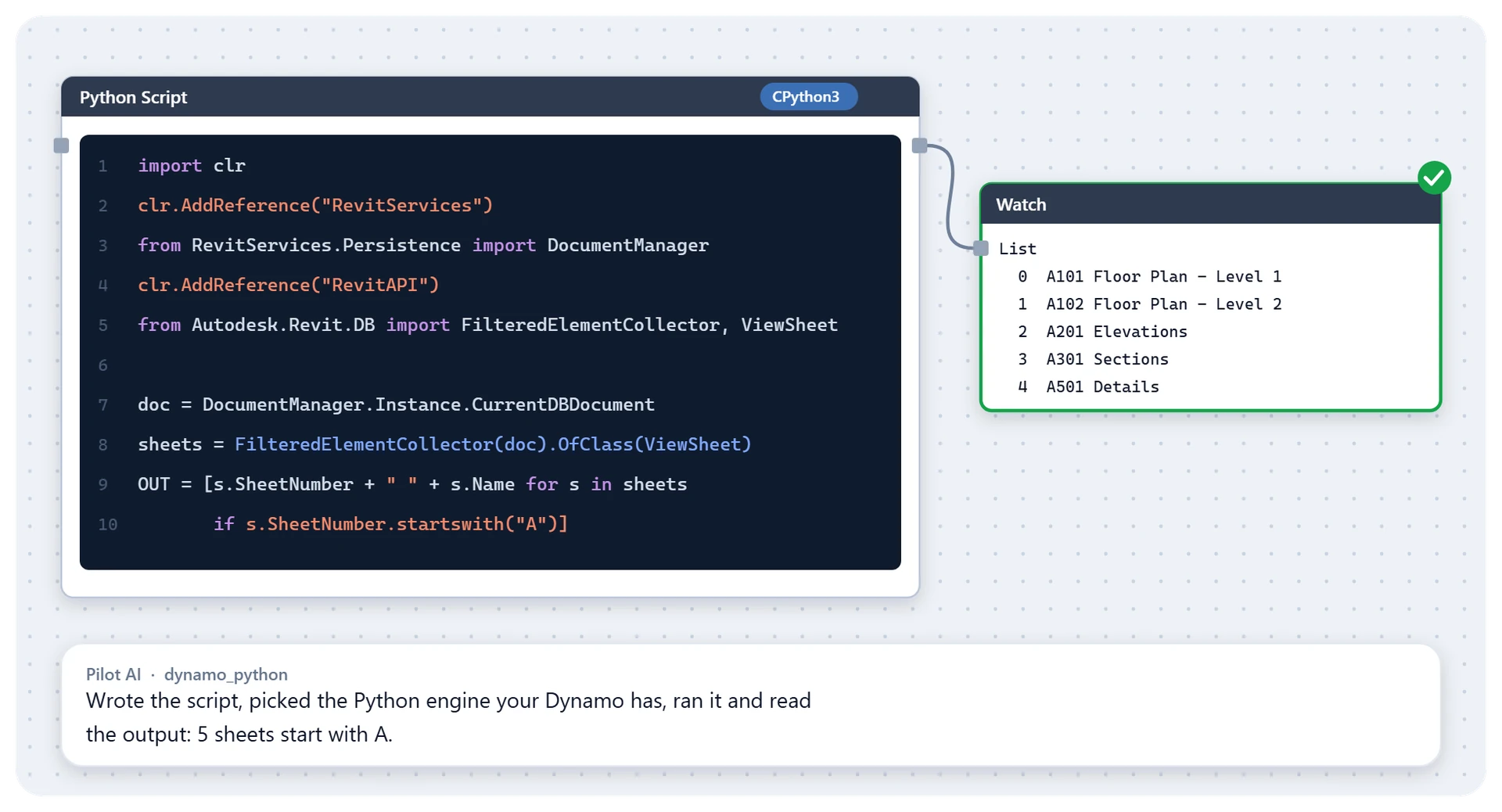
3. Add-ins built on the Revit API
Add-ins are compiled .NET programs with their own interface: the most capable option, but developer work, and each Revit generation moves the platform, from .NET Framework 4.8 (2023–2024) to .NET 8 (2025–2026) and .NET 10 (2027). Autodesk Platform Services (formerly Forge) runs such code in the cloud. Fits jobs common to many firms, where buying beats building, or jobs specific enough to yours to justify a developer.
4. AI assistants over MCP
You describe the result in plain language and an AI assistant does it in the open model. The link is the Model Context Protocol (MCP), an open standard that lets an assistant such as Claude or ChatGPT call real actions in other software. Without it, a chatbot can only describe the steps or write code for you to paste.
Fits one-off jobs, questions about the model and people who will never open Dynamo. It is less predictable than a saved graph, since a request can be read two ways, so check the result. For a weekly job with an exact rule, a saved graph or a dedicated tool is still better.
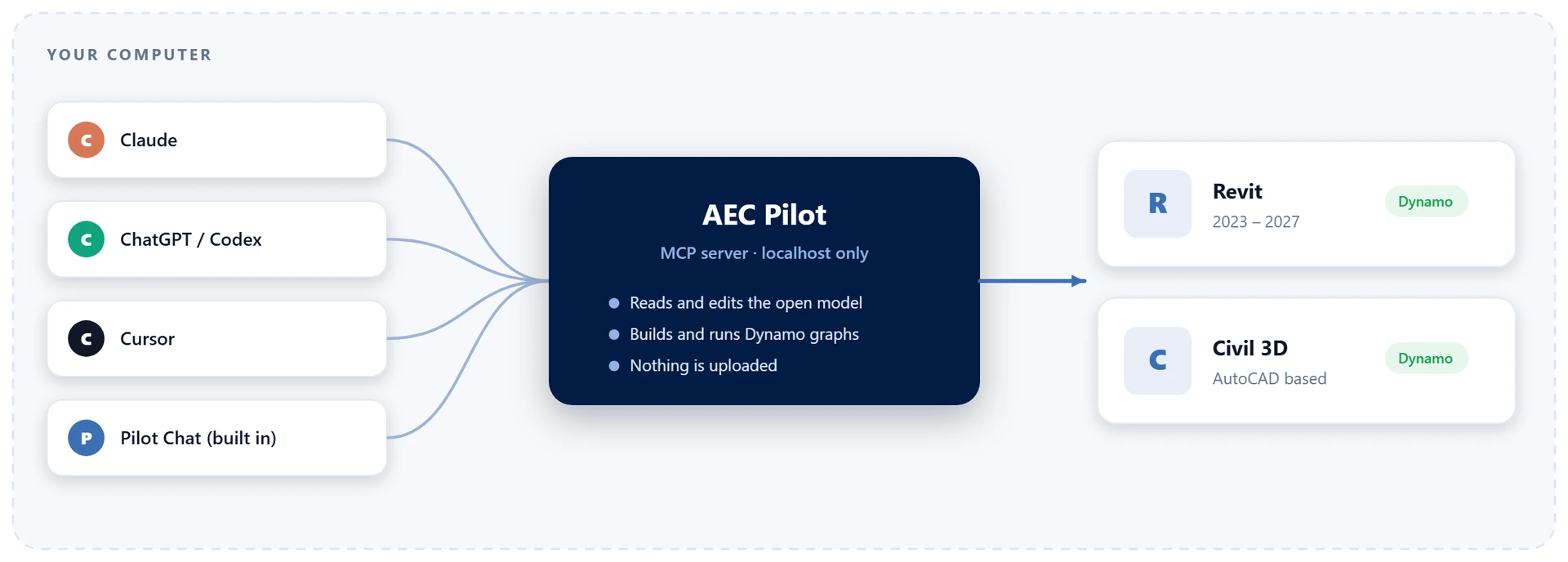
Combining them: AI that builds and runs Dynamo graphs
The best pairing is an assistant that writes the automation instead of being it. You describe the job once, the assistant builds and runs a Dynamo graph, and the team keeps a .dyn file that does the same thing every time.
That is Dynamo AI in AEC Pilot, for Revit and Civil 3D. It looks nodes up in the Dynamo you have running, packages included, so it does not invent them. It builds the nodes that write to the model frozen until you say go, lands each edit as one undo step and reads the real error on a failing node.
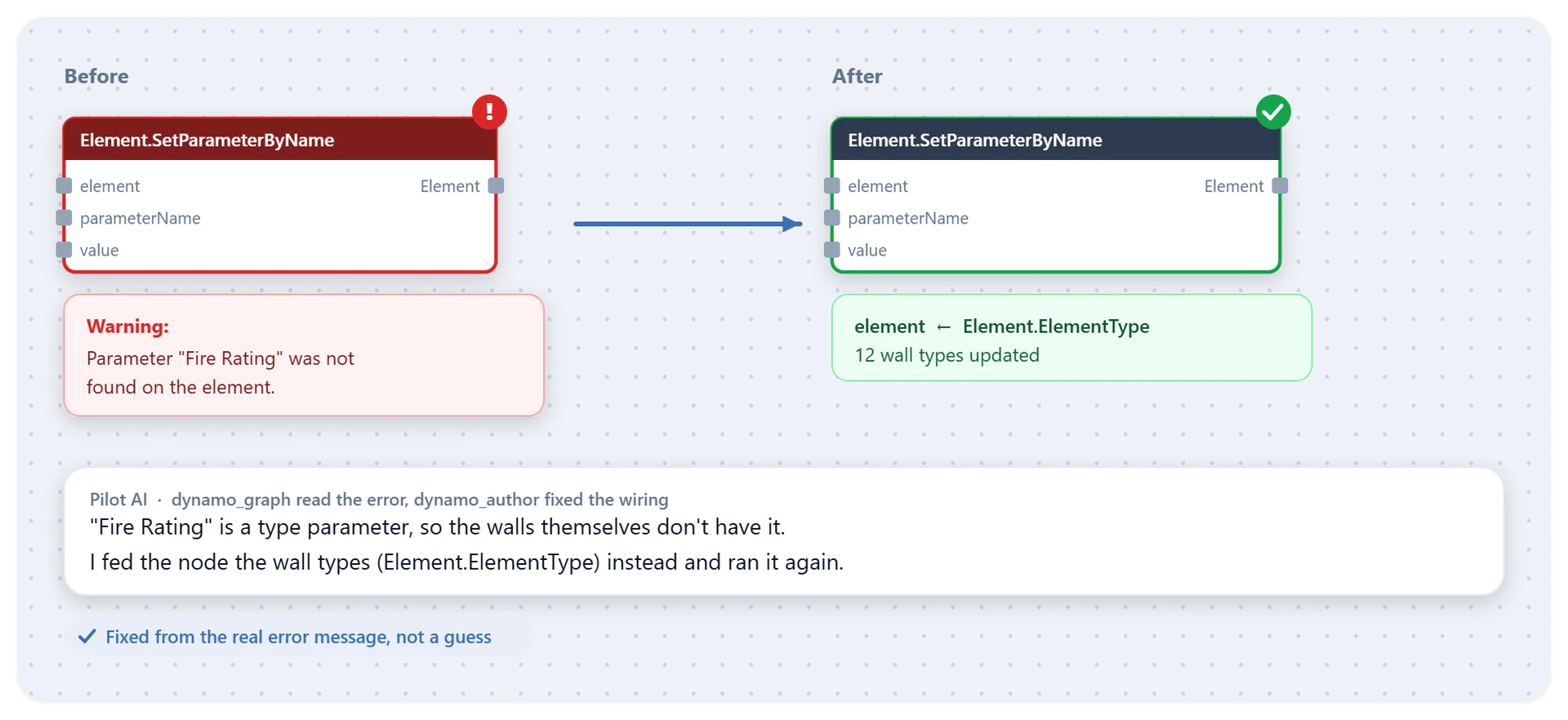
A practical starting plan for a team
- Collect the repeats for two weeks: every task done weekly with the same clicks.
- Write the rule in one line, such as “sheets by discipline, then level, then sequence”. No agreed line, no automation yet.
- Use the lightest tool: a ready-made tool, then a Dynamo graph, then a script, and an add-in only when nothing else will do.
- Try it on a copy, check a sample by hand, then run it on the live model.
- Give it a home: one shared folder, a one-line note, an owner, and a retest with each Revit version.
- Use AI for the rest: one-off clean-ups, questions, and the first draft of new graphs.
Where AEC Pilot fits
AEC Pilot is a set of add-ins and an AI assistant for Autodesk software, covering two steps of that plan.
Ready-made tools for the repeats
- Sequencer renumbers and renames by your own sequences and sort rules, with a preview first.
- Deliver exports PDF, DWG, IFC and NWC from one wizard with presets; Multi-Model Export makes IFC and NWC from many Revit files without opening them.
- DataBuild creates and binds project and shared parameters to many categories at once. ParaFlow round-trips parameters through Excel and writes back only what changed.
- Model Doctor scores model health from 0 to 100 and fixes the safe issues with a preview and one undo.
- LinkHub links Revit, IFC, CAD and point clouds in one run. Instant Clash shows host-versus-link clashes live, and Batch Join joins or unjoins whole categories at once.
Sequencer · Deliver · Multi-Model Export · DataBuild · ParaFlow
Model Doctor · LinkHub · Instant Clash · Batch Join · All tools
Pilot AI for the rest
Pilot Chat sits inside the application and uses your own AI key, or you connect Claude, ChatGPT, Cursor or Google Antigravity over MCP in one click. Either way the assistant works on the open model through real API actions, in Revit and seven more Autodesk applications under one licence. In Revit, Compass passes anything its command search does not match to Pilot Chat.
Cautions for live projects
- Review is yours. Preview where you can, check a sample after each run, and remember an AI assistant can misread a request.
- Know what undo covers. AEC Pilot changes the model in named transactions, so Ctrl+Z reverses them; exported files are not undone.
- Guard the risky parts. Deleting needs an explicit scope, Pilot Chat asks before running code the assistant writes, and the code tool can be switched off.
- Data stays local. The MCP server listens on localhost only and the model is never uploaded; your AI provider sees only what the assistant reads to answer you.
- Know which model is active. Tab Tinter colours each open file’s tabs, so a change lands where you meant it.
Requests to try
- “Which walls on Level 3 have no Fire Rating? Set them to 60 minutes.”
- “Create a sheet for each level and place its floor plan on it.”
- “List the warnings in this model, grouped by type.”
- “Build a Dynamo graph that lists every wall type with its total area.”
- “In AutoCAD, plot all layouts in this drawing to PDF.”
- “In Navisworks, run every clash test and export an HTML report with images.”
Frequently asked questions
What is BIM automation?
Using software for the repetitive, rule-based parts of BIM work, such as renumbering, sheets, exports, parameter edits and model checks, so the same input always gives the same result. In Revit that means Dynamo, scripts, add-ins or AI assistants.
Do I need to code to automate Revit?
No. Ready-made add-ins cover the common jobs, Dynamo is visual, and an AI assistant connected to Revit takes plain-language requests.
Dynamo or Python: which should I learn?
Start with Dynamo if nobody on the team writes code; move to Python when graphs get hard to follow. It is not either-or: a Python node runs inside a Dynamo graph.
Can AI automate Revit?
Yes, when it is connected to the live model. With AEC Pilot, Pilot Chat, or Claude, ChatGPT and Cursor over MCP, carry out real Revit actions and can build and run Dynamo graphs. Check the result as you would a colleague’s.
Is BIM automation safe for live projects?
Yes, with the habits of any bulk change: try it on a copy, preview, check a sample. In AEC Pilot, model changes can be undone, deleting needs an explicit scope and everything runs on your machine.
Automate your next repetitive Revit job.
Free for 14 days — every tool, no card required.