Guide · IFC delivery
IFC model checker: what to check before you deliver an IFC, and where to fix it
An IFC model checker answers one question: does the file you hand over hold what your client asked for? Most of what fails is decided long before export, in the authoring model. Here is what to check, which kind of tool checks it, and how to fix it at the source in Revit.
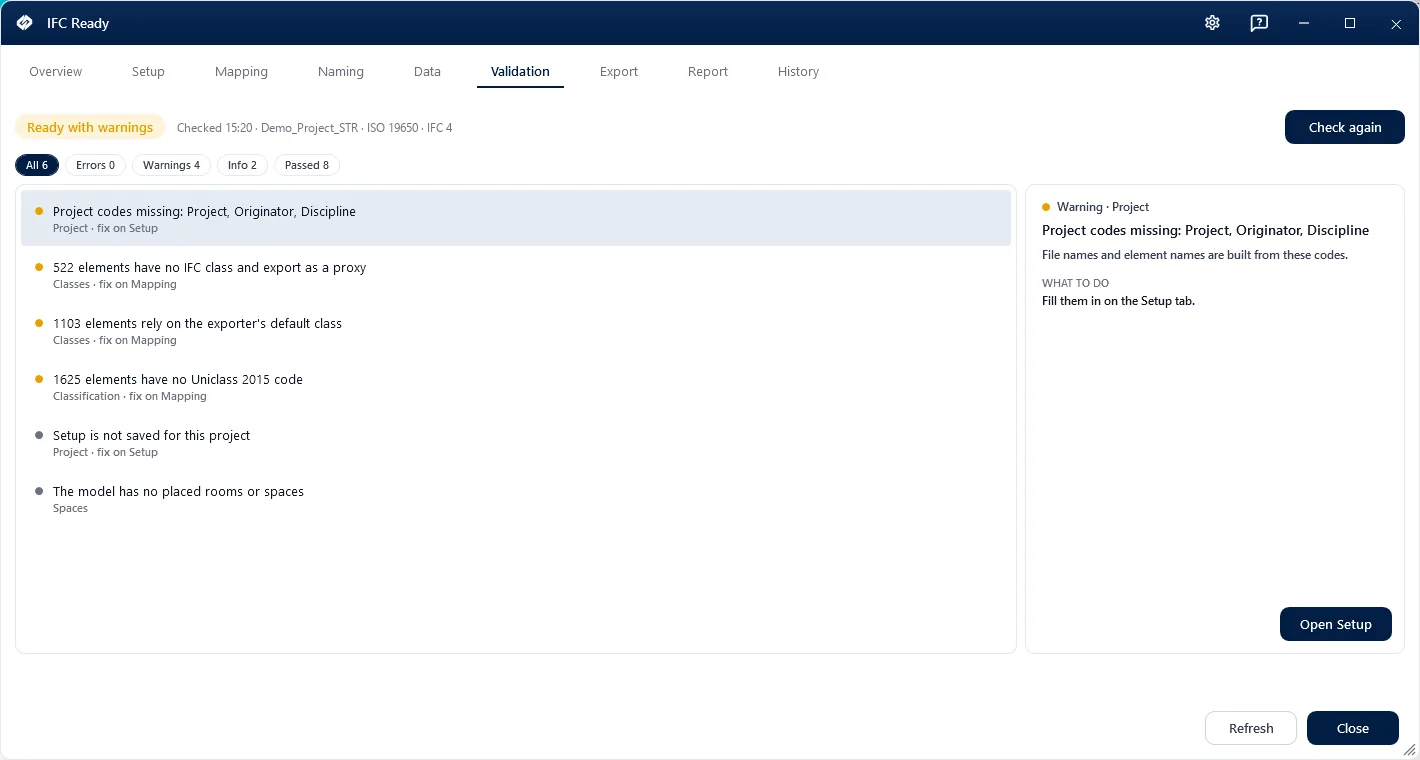
What an IFC check looks at
- File and schema. The file is valid STEP and valid against the IFC version it declares, IFC 2x3, IFC 4 or IFC 4.3, including the standard's own rules.
- IFC classes. Each element leaves as the right class, IfcWall, IfcDoor, IfcPipeSegment, with a PredefinedType that exists in that IFC version. IfcBuildingElementProxy is the catch-all for elements without a class, and many requirements forbid or limit it.
- Classification. Codes such as Uniclass 2015 sit on the elements the client asks for, and reach the file as classification references.
- Names. Element names and the file name follow the project's naming rule, for example the fields of ISO 19650 or a national convention.
- Properties. The property sets and values the requirements ask for are filled, such as IsExternal, LoadBearing and FireRating in Pset_WallCommon, and materials are named.
- Spatial structure. Site, building and storeys are right, and spaces are placed and enclosed.
- Location. The site and its coordinate reference system are what the client expects, where the requirements ask for one.
Two kinds of check: the standard, and your project
Against the IFC standard. buildingSMART, the body behind IFC, runs a free online IFC Validation Service. You upload a file and it checks the syntax, the schema and the standard's normative rules, and warns about common-practice issues. Project, national or company requirements are outside its scope, by its own description.
Against your project's requirements. This is the check that decides acceptance: the classes, codes, names and values your client asked for. Since June 2024, buildingSMART's IDS (Information Delivery Specification) 1.0 standard lets a client write those requirements in a file that software can test an IFC against. Dedicated model checkers and open-source libraries such as IfcOpenShell's IfcTester read IDS files.
Both run on the exported file. That makes them the right final gate, but the fix still happens in the authoring model: a wrong class or a missing value is changed in Revit and exported again. The earlier you check the model itself, the fewer rounds you spend between the two.
Where IFC problems start in Revit
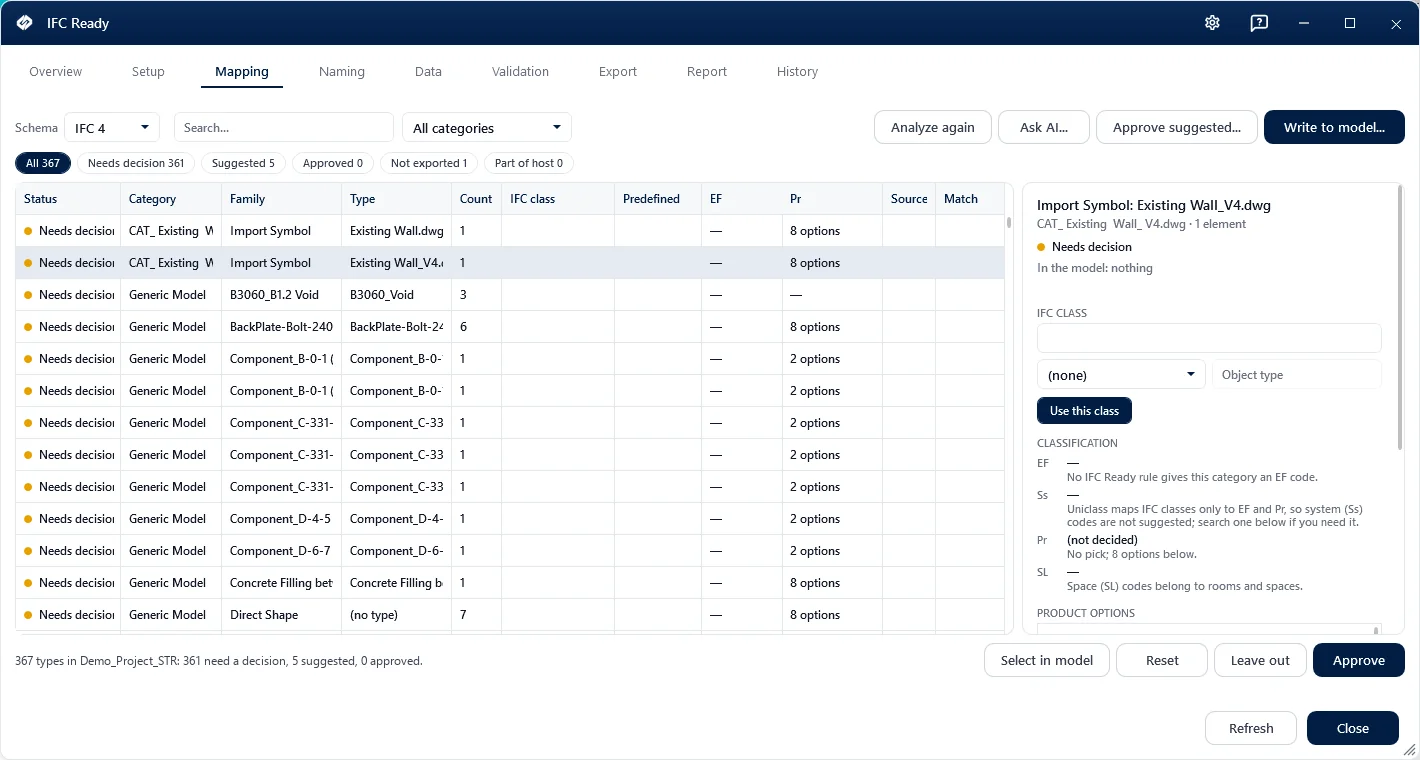
- Proxies. When the exporter has no class for an element, it writes IfcBuildingElementProxy: generic models, in-place families, many equipment families. Set the class with the built-in “Export to IFC As” and “IFC Predefined Type” parameters, on the type or the instance.
- Version. A PredefinedType valid in IFC 4.3 may not exist in IFC 2x3, where IfcDoor and IfcWindow have none at all. Check the class against the version you deliver.
- Names. Unless you set IfcName, an element's name in the IFC is Family:Type:ElementId, which rarely matches a naming rule.
- Classification. Codes kept in your own parameters reach the IFC only when the exporter's classification settings name those parameters.
- Site. The first site or topography element becomes IfcSite, and the site's properties are read from it, not from Project Information. A stray site element can carry the wrong data into the file.
- Storeys and spaces. Only levels marked “Building Story” become storeys; rooms that are not placed or not enclosed do not export as spaces.
Checking the model in Revit with IFC Ready
IFC Ready is the AEC Pilot tool that runs these checks on the open Revit model, before export, and fixes them there. It works in Revit 2023–2027.
- Profile. ISO 19650 (UK) or e-PYS (Turkey). The profile sets the IFC version, the naming rule and what is required.
- Mapping. Every Revit type gets an IFC class, a PredefinedType and Uniclass 2015 codes, from rules and the Uniclass catalogue, checked against the IFC version. You approve; then it writes them to the model. Types the rules cannot place can go to your AI for a suggestion, which you approve too.
- Naming and data. Element names to the profile's rule, and the missing property values listed by type and filled in bulk.
- Validation. A list of what still fails, each finding with the elements to select in the model.
- Export and read-back. IFC 2x3, IFC 4 or IFC 4.3. After export it reads the written file back and sums up its classes, proxies, property sets and quantities.
- Report. For e-PYS, the quality form filled in from the checks, as an Excel file.
IFC Ready · Model Doctor: Revit model health · Revit MCP · Pricing
A checklist before you export
- Agree the IFC version and exchange with the client, for example IFC 4 Reference View or IFC 4.3.
- Give every exported category a class; keep no proxy you did not choose.
- Fill the classification codes, and tell the exporter where they are.
- Name elements and the file to the project's rule.
- Fill the required property values, and check material names.
- Mark the right levels as storeys; place and close the rooms.
- Set the site and coordinates the client expects.
- Export, read the file back, and run it through a validator before you send it.
Based on public information as of October 2026, including buildingSMART's own pages, and on our tests with Revit's IFC exporter. Exporter behaviour can change between versions; check yours.
Revit is a trademark of Autodesk, Inc. IFC and IDS are standards of buildingSMART International. AEC Pilot is not affiliated with Autodesk or buildingSMART.
Frequently asked questions
What is an IFC model checker?
Software that checks an IFC model against the IFC standard, against a project's requirements, or both. A validator says whether the file is valid IFC; a requirements check says whether it holds the classes, names and data the client asked for.
Is there a free online IFC validator?
Yes. buildingSMART's IFC Validation Service checks a file's syntax, schema and the standard's normative rules at no cost. It does not check project-specific requirements.
What is IDS?
The Information Delivery Specification, a buildingSMART standard since June 2024. It lets a client write information requirements in a file that software can check an IFC model against.
Why does Revit export elements as IfcBuildingElementProxy?
Because the exporter found no IFC class for them, often generic models and in-place families. Set “Export to IFC As” and “IFC Predefined Type” on the type or instance. IFC Ready lists every such type and asks you for a decision.
Can I check an IFC model without leaving Revit?
You can check and fix the Revit model before export with IFC Ready, which then reads the exported file back. For the delivered file, run your client's checker or a validator as the final gate.
Does IFC Ready check IFC files from other software?
No. It works on the open Revit model and the IFC it exports, in IFC 2x3, IFC 4 or IFC 4.3, on Revit 2023–2027.
Check your Revit model before the IFC goes out.
Free for 14 days — every tool, no card required.