Guide · Fusion
Fusion 360 MCP: connect Claude, ChatGPT or Cursor to Autodesk Fusion
Your AI assistant can work in the Fusion design you have open: sketch, model, check and take a part to G-code. The way in is MCP, the Model Context Protocol. Fusion now has two MCP servers, Autodesk’s own and AEC Pilot’s. Here is what each does, how to connect Claude, ChatGPT / Codex or Cursor, and what one real request produced.
Two MCP servers for Fusion
They listen on different ports, so you can keep both switched on and let the assistant use whichever fits the job.
All 64 actions, the supported versions and the free trial: AEC Pilot for Fusion
Connect Claude
Install AEC Pilot and open Fusion: the AEC PILOT tab appears in the Design workspace. Click Settings, open Setup Guide and click Configure next to Claude Desktop or Claude Code. AEC Pilot writes the aec-fusion entry for you and keeps the other MCP servers you already have. Quit and reopen Claude, then ask:
“Use aec-fusion: which design is open, and what is in its timeline?”
The Status light on the AEC PILOT tab is green while the connector is running.
Connect ChatGPT and Codex
Use the ChatGPT desktop app, the Codex CLI or the Codex IDE extension: they take MCP servers on your own computer and share one configuration file, so one Configure next to ChatGPT / Codex covers all three. ChatGPT on the web uses only remote tools, so it cannot reach a server running inside Fusion on your PC.
Cursor, Antigravity and Pilot Chat
Cursor and Google Antigravity have their own rows in the same Setup Guide. If you would rather not use an external client at all, click Chat on the AEC PILOT tab: Pilot Chat opens docked to the right edge of Fusion and works with your own Claude, OpenAI, Gemini or DeepSeek key.
A real request: from a plate to toolpaths
We built a 120 × 80 × 12 mm aluminium plate with four holes and a pocket, then gave Pilot Chat one sentence:
“Create a milling setup for this plate, add adaptive clearing for the pocket and a 2D contour around the outside with a 6 mm flat end mill, calculate the toolpaths and tell me the machining time.”
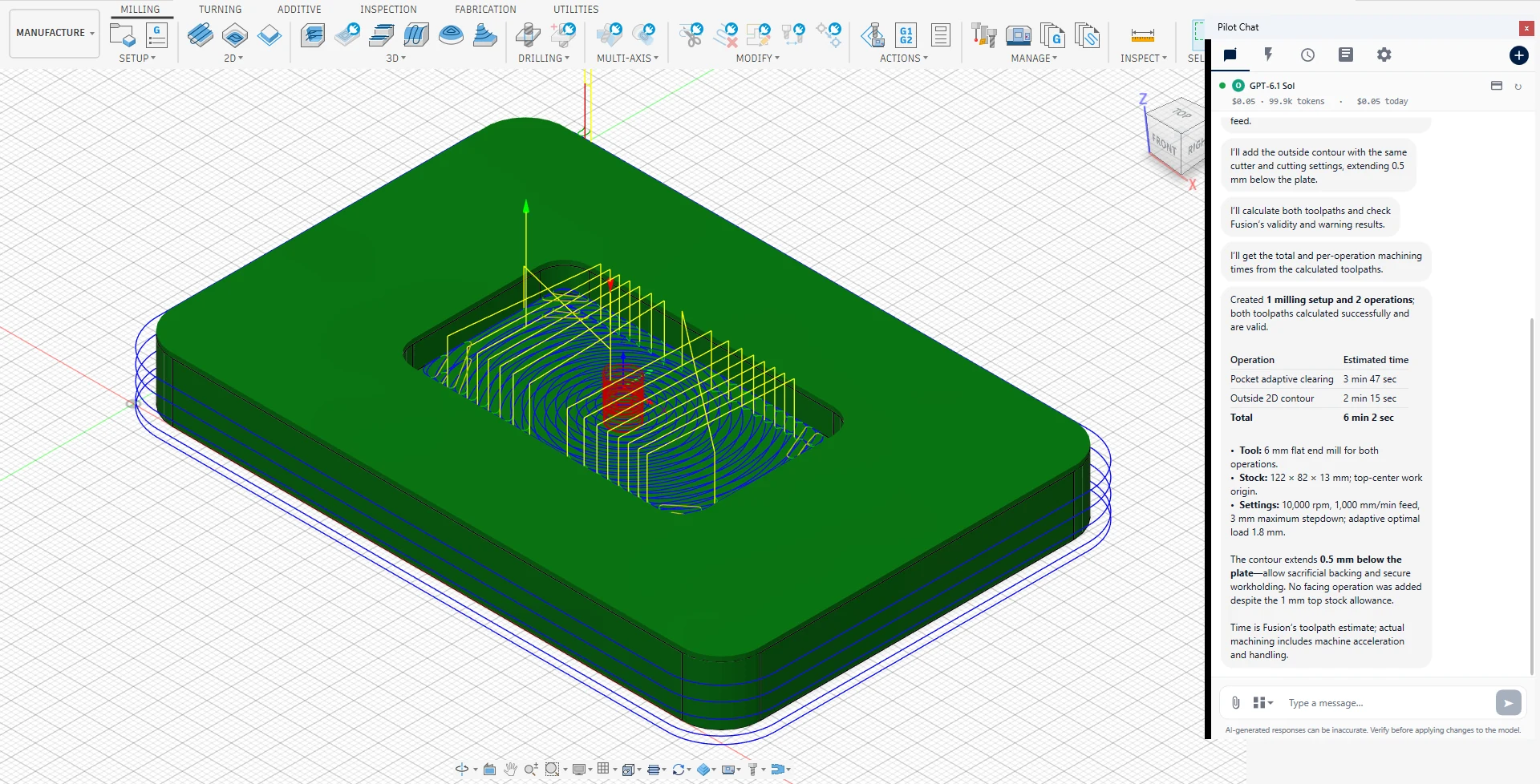
- Stock 122 × 82 × 13 mm with the work origin at the top centre.
- Pocket adaptive clearing: 3 min 47 s. Outside 2D contour: 2 min 15 s.
- Total machining time 6 min 2 s, read from the calculated toolpaths, not estimated.
It also noted that the contour goes 0.5 mm below the plate, so the part needs a sacrificial backing. One more sentence, “post the setup for Haas and save the G-code”, turns it into NC code.
If it does not connect
- Fusion must be running: the server starts with Fusion, and the Status light on the AEC PILOT tab is green while it runs.
- Quit the AI client completely and open it again after Configure: it reads its settings only at start-up.
- If Fusion updated itself to a newer Python than your AEC Pilot was built for, the add-in tells you so: install the latest AEC Pilot.
- Windows only for now; macOS is not supported yet.
First requests to try
- “Sketch a 120 × 80 mm plate, make width and height user parameters, extrude it 10 mm and fillet the vertical edges 5 mm.”
- “Set width to 150 mm, make the body aluminium and tell me its new mass.”
- “Check the assembly for interference and tell me which bodies overlap and by how much.”
- “Export the bracket body as STEP and the whole design as 3MF for printing.”
Frequently asked questions
Is there an MCP server for Fusion 360?
Yes, two. Autodesk builds one into Fusion (formerly Fusion 360), switched on in Preferences → General → API. AEC Pilot adds a specialised one with 64 typed actions and Pilot Chat inside Fusion. They use different ports, so you can keep both.
Can ChatGPT control Fusion?
Yes, from the ChatGPT desktop app, the Codex CLI or the Codex IDE extension, through a local MCP server. ChatGPT on the web cannot reach a server on your PC.
Can AI make CAM toolpaths and G-code in Fusion?
Yes. AEC Pilot’s nine CAM actions create the setup and operations, calculate the toolpaths, read the machining time and post the result to NC code. Only strategies your Fusion licence can generate are accepted.
Can I undo what the AI did?
With AEC Pilot, yes: every action is one Fusion command, so one Ctrl+Z takes it back, however many edges or operations it touched.
Does my design leave my computer?
Not through AEC Pilot: its server listens on localhost only and never uploads your designs. The AI sees what the tools return for the questions you ask. Fusion itself keeps saving to your Autodesk cloud as always.
Is the Fusion MCP server on by default?
You switch it on yourself: in Preferences → General → API, tick Fusion MCP Server, the same steps Autodesk’s own blog gives. AEC Pilot for Fusion is an add-in with its own server: install it, then connect your client once from its Settings.
Does the Fusion connector for Claude replace scripting?
No, it relies on it: with Autodesk’s server the assistant writes and runs Fusion API scripts for most steps. AEC Pilot’s 64 typed actions do sketches, features, parameters, joints and CAM without a script, and each one is a single Fusion command that one Ctrl+Z undoes.
Does it work with the Fusion Manufacturing and Simulation extensions?
AEC Pilot’s CAM actions check each strategy against your Fusion licence, so strategies that need the Manufacturing Extension work only when you have it. Simulation is not covered: there are no simulation actions.
How much does it cost?
AEC Pilot is free for 14 days, then €199 per seat per year + VAT, for all nine applications on the computer. You use your own AI account; AEC Pilot adds no AI fee.
Put Claude to work on your next part.
Free for 14 days — every tool, no card required.